
When looking for a new role in tech, an optimized LinkedIn profile is essential. Discover our top tips for an optimized LinkedIn profile in this guide, co-written with our Global Operations Director, James Aldridge.
Register to learn more about our Tech Career Programs
How important is LinkedIn when applying for a specialist tech role?
Think of LinkedIn as your personal brand. Whether or not you already work in the tech sector, it can showcase just how tech-savvy you are. It’s often the first thing a prospective employer or a LinkedIn recruiter will look at, after scanning your résumé.

There are two sides to LinkedIn if you’re using it to apply for tech roles:
- Looking through LinkedIn’s jobs board to find your dream role in tech
- Optimizing your LinkedIn profile to showcase your skills and abilities, enabling tech recruiters to find you
If you have a great LinkedIn profile that’s optimized, chances are people will come to you with job opportunities! So, how do you optimize your LinkedIn profile to boost your opportunities of landing a sought-after role in tech?
LinkedIn’s algorithm scores your profile and will assign you a certain number of points for each section of your profile that you complete. The more points you have, the higher it will rank you in search results when employers are looking for suitable candidates.
Let’s take a closer look at how you can optimize each section of your LinkedIn profile to give yourself more chance of appearing in tech recruiters’ search results.
1. How to optimize your LinkedIn headline and URL
If you’re familiar with the concept of Search Engine Optimization (SEO), then it’s helpful to think of your LinkedIn profile as a webpage that needs to be SEO-optimized to meet the requirements of the LinkedIn search engine algorithm, so that potential employers and recruiters can find you more easily, and approach you about relevant roles you’re suitable for.
“Most people think of their LinkedIn headline as where you put your job title. But it’s so much more than that,” James says. “Recruiters who work in the tech sector will actively reach out to people whose skills and experience match their job spec, so you need to ensure that your LinkedIn headline has all your key skills and competencies listed. The more suited your headline is to the role, the higher up your profile will appear when recruiters look for candidates to fill a particular vacancy.”
For example, if you’re looking for a Cloud Developer role, here are some of the skills you should consider adding to your LinkedIn headline: programming languages, work with APIs, database management, network management, cloud security, DevOps, machine learning and AI, to list a few.
But it’s not just your headline that needs optimizing. To show just how tech-savvy you are, make sure you customize your LinkedIn URL.
When you first register, LinkedIn will generate an automatic URL which will likely contain random numbers. However, you can customize this to whatever you like for free. If we use the same example of a Cloud Developer, you may want to change your URL to display your name, followed by Java, Python, or a different programming language you’ve mastered.
Pro tip: To give you a better idea, search on LinkedIn for people who already work in your dream role. Take a look at their profiles and see what similarities they share in their headline and LinkedIn URL.
2. How to optimize your profile photo and LinkedIn background banner
“Remember that your photo creates the first impression. So, just make sure that the impression it creates is what you intended,” James advises.
What’s acceptable and what isn’t will vary from one industry to another. For example, if you’re looking for a new role in the creative industries, then you may wish to have a more creative photo. Whereas if you’re applying for a job in a sector where professional business attire is more customary, then consider wearing this for your LinkedIn headshot. As a general rule, however, it’s best to use a photo where you look happy, with your head & shoulders in sight, on a professional or neutral background. While you don’t necessarily need to splash out by paying a professional photographer, do try to avoid selfies and ask someone else to take your photo.
“Don’t forget to optimize your LinkedIn background banner as well,” James reminds. “Again, it’s important to use a design that aligns with the industry you’re applying for.”
Pro tip: You don’t have to be an expert photographer or designer—there are lots of royalty-free images online. For instance, a quick search on the popular imaging tool Canva will bring up hundreds of options if you search for a LinkedIn banner, all for free.
When looking for work, some people choose to add the ‘Open to work’ banner to their image. However, this can sometimes be suggestive that you’ve been looking for a long time.
Pro tip: James advises selecting the option in your LinkedIn settings that displays the banner only to recruiters, rather than everyone on your network. This way, the badge ‘Open to work’ won’t appear on your public profile image, which can be a savvy trick if you’re currently employed and don’t want your employer to find out you’ve been looking at other roles. Check out this handy guide for details on how to enable this crafty setting.
3. How to optimize your LinkedIn profile overview and previous experience
About me section
If you’re looking for a new role, then this is the best place to promote your skills, knowledge, and industry experience.
And remember, the tech sector needs people from all kinds of backgrounds. Even if you don’t currently work in technology, your prior industry experience and transferable soft skills will still be valued highly, so make sure you’ve highlighted these.
“In this section, you can also list any interesting projects or tasks you’ve worked on that have really stood out—as long as you’re not sharing confidential or sensitive information, of course,” James advises.
It’s also good to add your values at the bottom of the section, to give an idea of who you are as a person.
Consider adding your contact details too (email address or cellphone, if appropriate), as some recruiters may prefer to contact you outside of LinkedIn.
Featured section
Since most roles in specialist technologies like cloud computing, data, or AI are project-led, it’s good to utilize the ‘featured’ section to showcase some of those projects. The easiest way to do this is by adding a link to a website or project you’ve worked on (again, just be mindful of confidentiality). Don’t worry if you’ve only ever completed a passion project or voluntary work—all this still shows you have project management skills, you stick to deadlines, and you’re used to communicating with a range of stakeholders.
Work history & education
One of the first things a potential employer will look at is whether the résumé you’ve submitted matches the experience and/or education listed on your LinkedIn résumé and profile, so you need to make sure that section is all up-to-date and consistent.
Pro tip: Make sure you attach a résumé to your LinkedIn profile. Although this will only be visible to recruiters who use LinkedIn Talent Solutions, it will make it easier for them to spot and assess your suitability for the role. Check out this step-by-step guide from LinkedIn on how to attach it.
4. How to optimize your LinkedIn recommendation section
It’s a good idea to get testimonials for your LinkedIn profile from previous colleagues or managers, to serve as social proofing for the skills and abilities listed on your LinkedIn résumé.
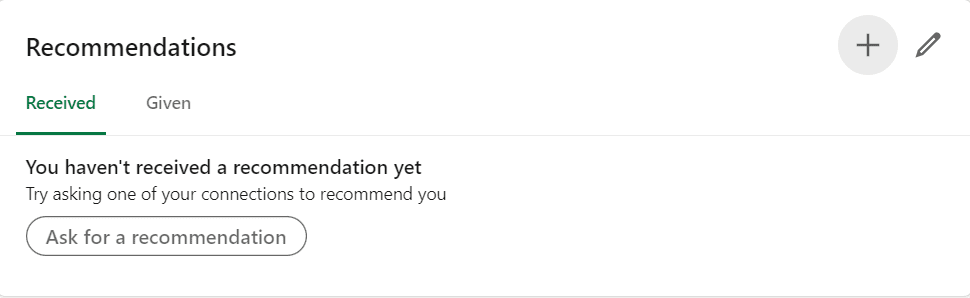
It’s quick and easy to do—simply go to the ‘Recommendations’ section on your profile, select + and ‘Ask for a recommendation’. This will bring a pop-up where you can type in the names of people you’d like to reach out to for a recommendation, with an option to personalize the message, if you’d like to.
Don’t forget to return the favor and write a recommendation in turn for anyone who’s boosted your profile! In fact, this can be a nice way to strengthen connections within your existing network.
5. How to optimize your LinkedIn profile activity
If you’re applying for a role in tech, a great way to showcase your passion for the industry is by liking, sharing, and commenting on related content, as well as joining specific interest groups.
“Employers won’t judge you on how active you are or how frequently you post because, obviously, not everyone has time for this. However, to get a sense of where your passion and interests lie, recruiters might flick through the companies, people, and groups you follow,” James adds.
Pro tip: Allocate just 30 mins a week to share and like posts that are relevant to your industry and spark your interest. This is a great way to build your knowledge base while scoring more points from the LinkedIn algorithm.
Furthermore, if you’re comfortable posting and creating content yourself, then go for it! Don’t forget to add a relevant hashtag—for example, #CloudJobs or #AI—to rank higher in relevant LinkedIn search results.
However, don’t worry if you’re not comfortable writing your own posts, as liking and sharing content by specialist tech thought leaders will still give you valuable insights into the industry you aspire to work in while scoring more points on the LinkedIn algorithm.
It’s also a great idea to join relevant LinkedIn groups, even if you never post anything. Whenever someone shares a post in that group, it will appear on your news feed, making it easier for you to spot an interesting article or industry announcement that you can share, like, and repost.
The five do's and dont's of LinkedIn jobs search
DO NOT
✘ Post content you wouldn’t want your employer to see
DO
✓ Match up previous experience listed on your résumé to your LinkedIn profile
✓ Join different interest groups
✓ Have a professional LinkedIn profile and cover photo
✓ Add relevant keywords to your LinkedIn headline
We hope you found these tips useful! And don’t worry about optimizing your LinkedIn profile all in one go—this is usually an ever-evolving process as you go deeper into your job search and build more knowledge of the type of roles and industries you wish to apply for.
Ready to supercharge your career by cross-training into a specialist tech role?
Did you know you can earn while you learn with Revolent?
