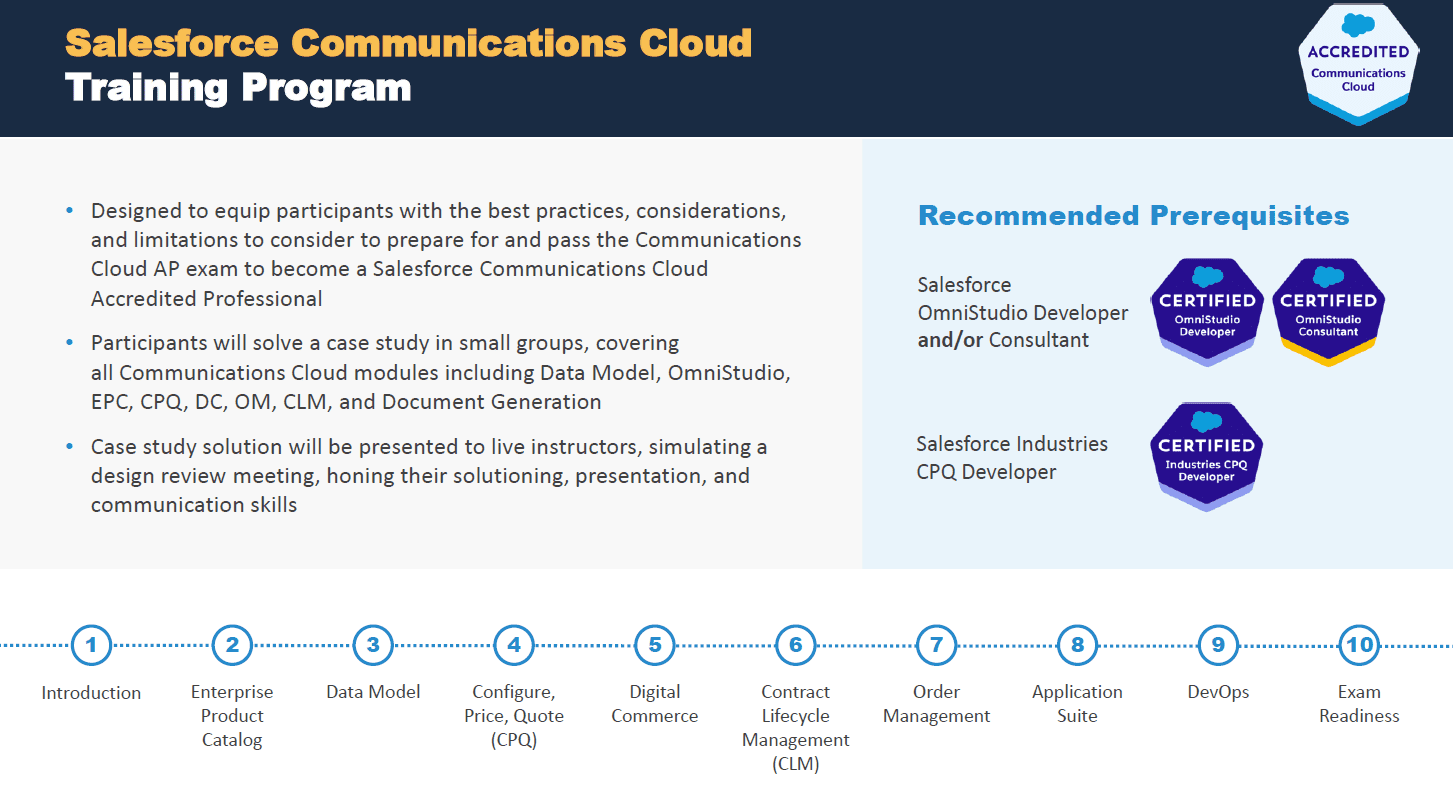
Whether you’re a Salesforce partner, end-user, or consultant, here are five actionable tips to maximize your Communications Cloud implementation from our recent webinar, co-hosted with Salesforce. In this article, we’ll cover five best practices for:
- EPC design
- Cart-based APIs
- Order management

Jeff Bygrave
Strategic Sales Director at Salesforce
- Over 20 years’ experience in a variety of commercial and technical positions
- Career spanning complete spectrum of customer, integrator, and vendor roles
- Accelerated Salesforce’s Industry solutions into key Telco accounts in the UK

Rochus Heller
Salesforce Industries Enablement Director at Revolent
- 21 years of experience in Communications CRM, including four years in Vlocity
- Founded and led Vlocity Expert Services EMEA
- Evangelist for best practices in EPC, CPQ, DC, OmniStudio

Georgii Saveliev
40x Certified Salesforce Technical Architect and Trainer at Revolent
- Five years’ experience with Communications Cloud, eight+ years in Salesforce
- 10+ Communications Cloud Implementations across EMEA and APAC
- Contributor to Communications Cloud AP and Industries CPQ Developer credential exams
What is Salesforce Communications Cloud?
Formerly known as Vlocity, Salesforce Communications Cloud is a game-changer when it comes to delivering tailored customer experiences. Using analytics and AI, Communications Cloud integrates with popular Salesforce products to help you provide simple, digital-first experiences that boost your customer loyalty and drive revenue.
Featuring functionality like an innovative communications data model, Configure, Price, Quote (CPQ) tools, Enterprise Product Catalog (EPC), order capture, Industries Order Management, and Contract Lifecycle Management, Communications Cloud can give your organization the power to quickly adapt to changes in the marketplace and deliver consistent results. Discover the full list of Salesforce Communications Cloud features on this page.
For Salesforce partners, Communications Cloud presents extensive market opportunities. In fact, implementations of Communications Cloud generally generate 4–10x the revenue of standard horizontal cloud projects.
5 best practices to boost your Communications Cloud capabilities
1. Get your EPC design right
Getting the design of your EPC right is a vital part of maximizing your Communications Cloud implementation. After all, a poorly designed EPC will inevitably lead to poorly performing CPQ.
Ensuring both top performance and functionality can be a tricky balance to strike. Often, there’s a tug-of-war between the two, and you should take care to make sure that the quantity and complexity of the functionality don’t have a detrimental impact on the performance.
You can achieve this by simplifying product models, pricing models, pricing rules, and product rules. Here are a few tips to help you keep things simple and efficient:
- Limit the number of hierarchy levels of product structures to four, including the root bundle
- Limit bundles to a maximum of ten child items
- Prioritize context rules over advanced rules (but ensure governance limits are honored, especially during repricing)
You can also take advantage of the caching that Salesforce Industries provides. However, you should carry out platform and pricing caching thoroughly from the start; the later you leave it, the more complex it will be.
Pricing customizations can have a big impact on performance too, so make sure you design these with performance in mind—well-implemented, and properly tested.
Similarly, ensure that your CPQ parameter settings are well-defined from the very beginning. Once a project is underway, modifying the CPQ parameters can put a spanner in the works.
And finally, avoid the lift-and-shift approach to replacing legacy CRM. Don’t try and carry over equivalent functionality and product structures from your legacy CRM into Salesforce Industries. Remember that your project will be less complex and go live faster if you take the time to review business processes and related requirements ahead of the migration.
2. Choose the right API for the job
CPQ is key to a successful and efficient sales process. It’s how you receive orders from customers and generate quotes.
With Communications Cloud’s CPQ function, there are two sets of APIs available:
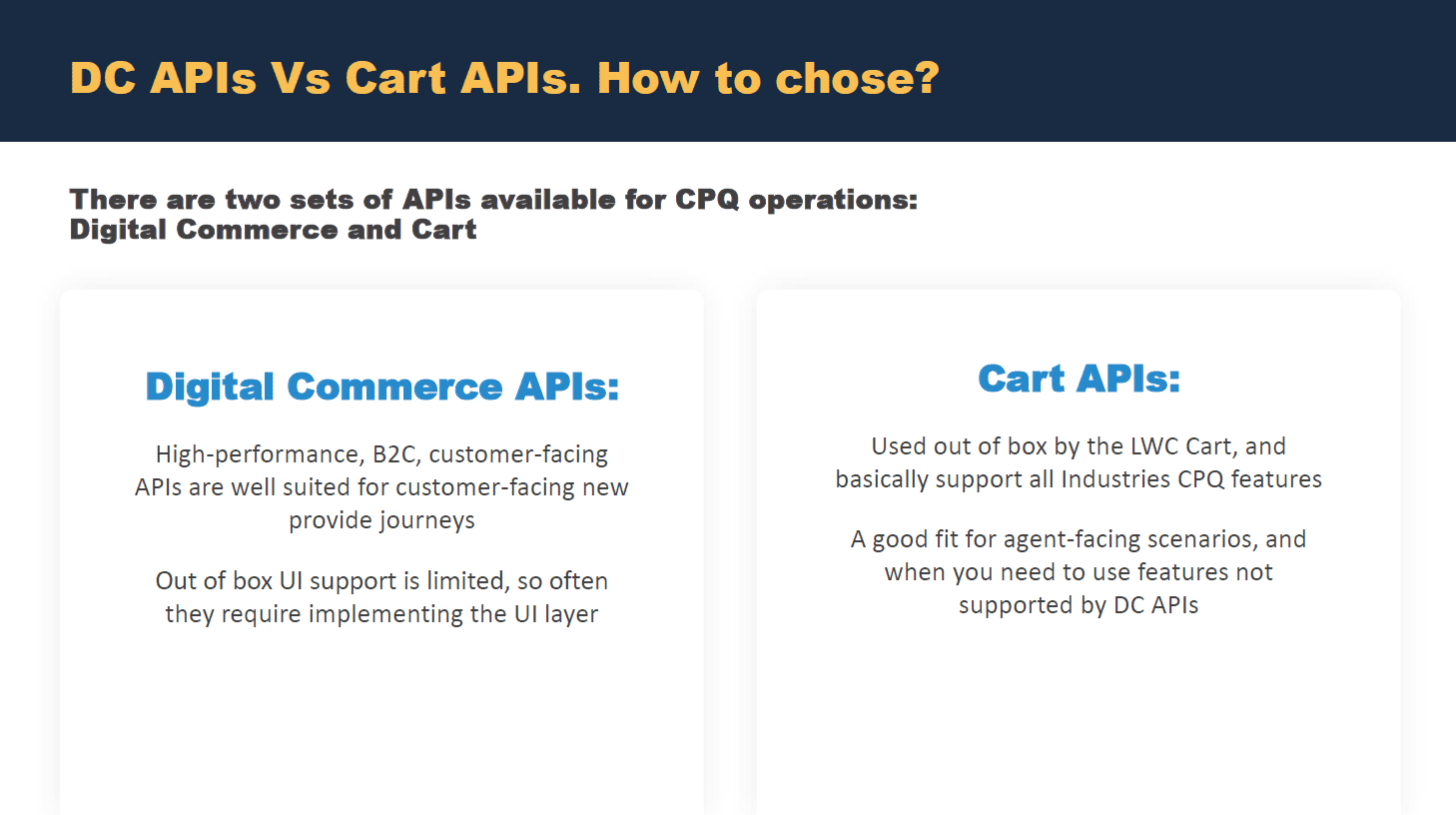
If you’re designing an API to take in orders or quotes from another system, you’ll need to choose which APIs to use.
So, what’s the difference between these two types of APIs?
Performance is one of the main differentiators.
Digital Commerce (DC) APIs are high-performance, B2C, customer-facing APIs that are well-suited for customer-facing new provider journeys.
The key differentiator of DC APIs versus Cart APIs is that DC APIs support anonymous browsing, meaning that your customers don’t need to identify themselves or share their location to view your product catalog or add products to their basket. Identification only comes in at the very end.
However, it’s worth bearing in mind that the out-of-the-box UI support for DC APIs is limited. The out-of-the-box AngularJS and LWC/FlexCard-based carts do not support the DC APIs. Those use the Cart APIs. So, if you opt to use DC APIs, you’ll need to implement the UI layer.
If we look at the Cart APIs, these are used out-of-the-box by the LWC cart and AngularJS cart. And these types of APIs support basically all of the Industries CPQ features. MACDs, implied amendment—anything you can really think of!
Although the performance is generally worse on these compared to DC APIs, they do support almost all the functionalities.
So, Cart APIs are a good fit for agent-facing scenarios and when you need to use features that are not supported by the DC APIs.
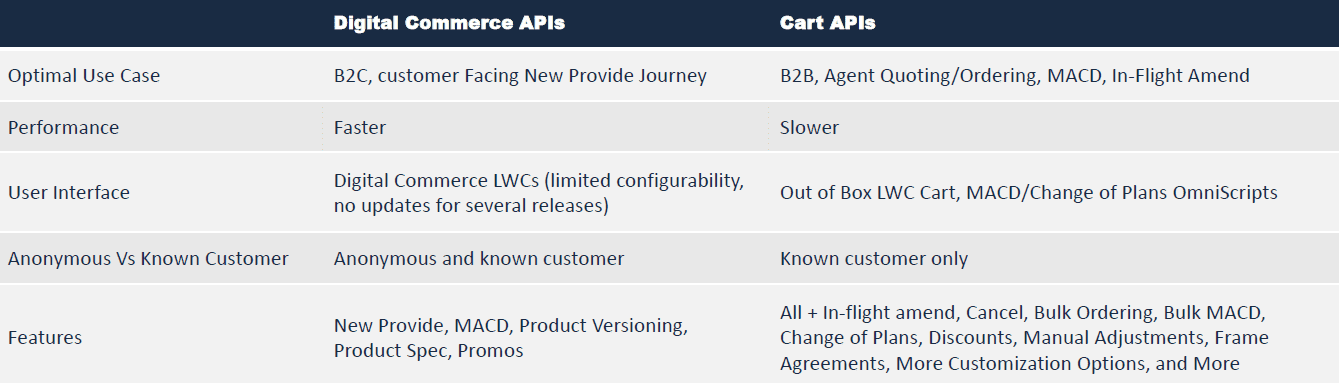
When you’re starting a new project and you’re deciding which set of APIs to use, there are certain factors you should consider. Let’s dig into these.
When it comes to use-cases, the best use-case for the DC APIs is a B2C, customer-facing, new provider journey: that means a customer is going in and selecting a product or a service, entering a delivery address, and making a payment.
For B2B scenarios, the Cart APIs are a better option, as they’re good for quoting and ordering when it’s the agent doing that on behalf of the customer.
From a performance perspective, Move, Add, Change, Delete (MACD), and inflight amendments are faster with DC APIs compared to Cart APIs.
In terms of UX, DC APIs have Lightning Web Components (LWCs), but these are limited in their configurability and may not be suitable for real-world projects. In contrast, Cart APIs support LWCs out-of-the-box, as well as MACDs and change-of-plan OmniScripts.
Customer status is another important factor to consider. DC APIs support scenarios where the customer has identified themselves and where they haven’t. Cart APIs require a customer to be in the system.
Other features included with the DC API include support for new MACD product versioning, product specification, and promotions. Cart APIs support everything that’s featured in Industries CPQ.
The key takeaway here is that these two types of APIs are not mutually exclusive. For a given use-case, you’ll typically use one, but for an entire implementation, you’ll likely use one for some use-cases, and the other for different scenarios. For example, you can use DC APIs where performance is critical and the features are sufficient, and Cart APIs for all other use-cases.
Pro-tip. A good rule of thumb is to try DC APIs, and if they’re not suitable for that situation, then go for Cart APIs.
3. Separate your commercial and technical catalogs
From an order management perspective, the main thing to bear in mind is the difference between the commercial and the technical product models.
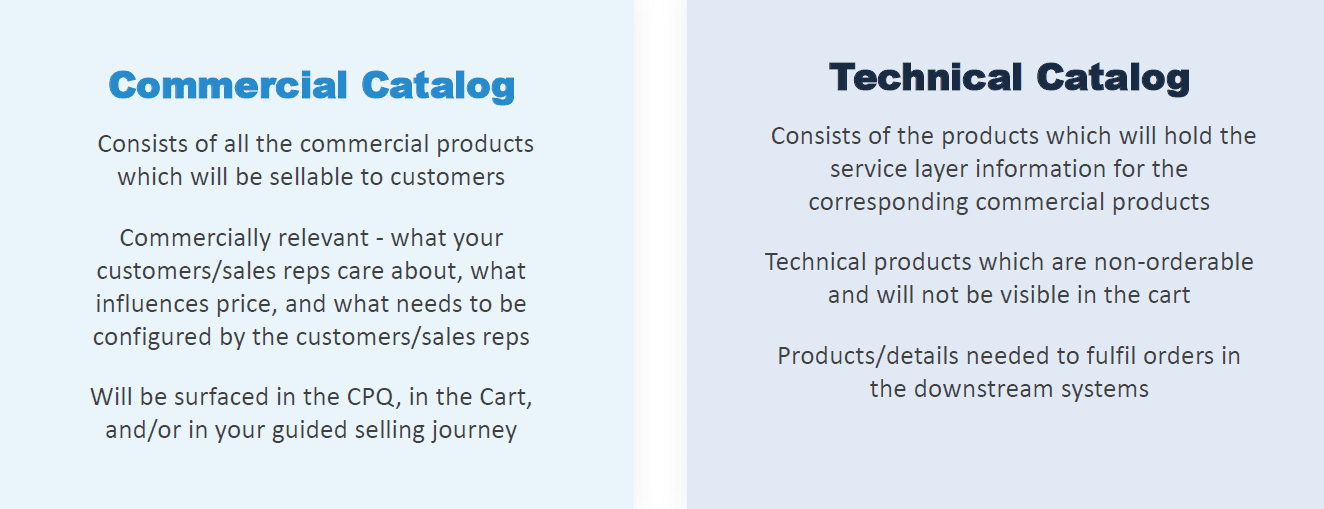
When planning your product modeling, you’ll need to create a commercial catalog. This is what will feed into your EPC and your CPQ during the sales process. The technical catalog will be used after decomposition, determining what information will be sent to downstream systems to fulfil or provision your order.
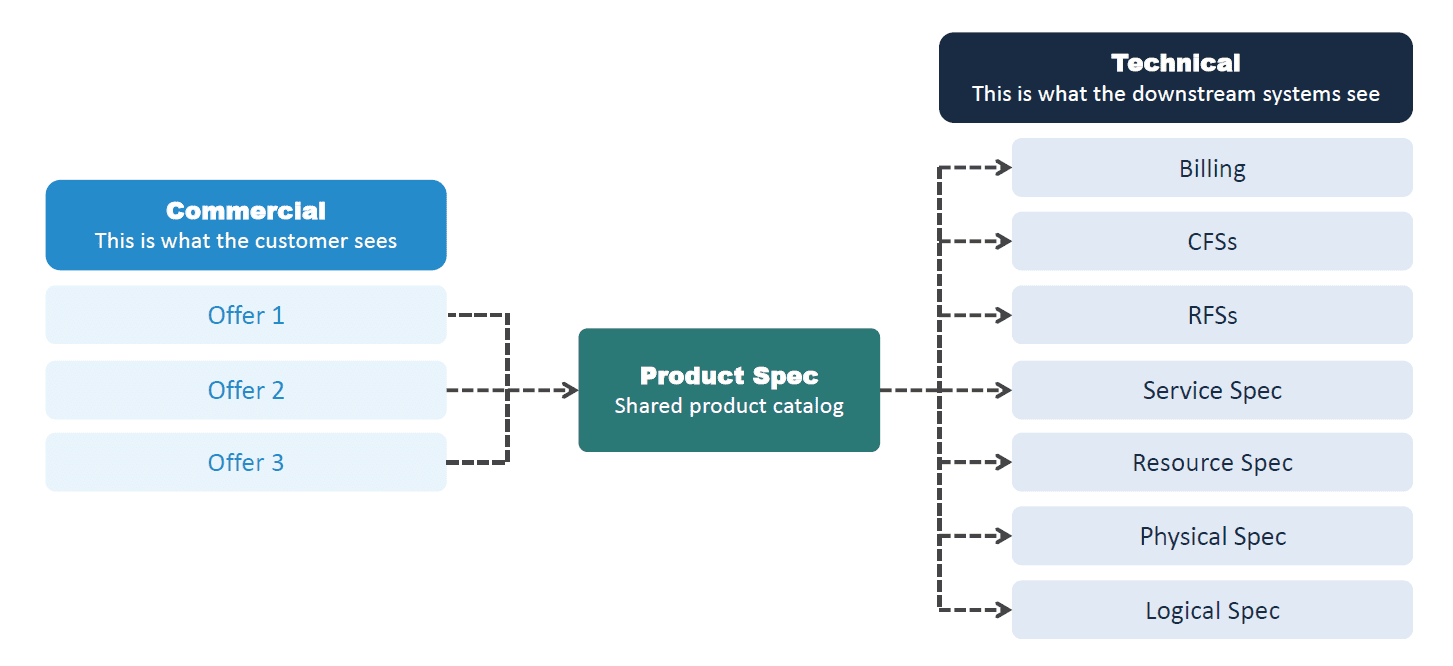
Essentially, the commercial product model is what the customer and the sales rep see during the sales process. Since it contains all of the commercial products that will be sellable to customers, the model should contain the commercially relevant information that customers and sales reps will care about. Things like, what influences the price and what needs to be configured by the customers and sales reps? This information will surface in the CPQ, in the cart, and in your guided selling journey.
For example, for a mobile plan, you would want to show aspects of a contract that the customer can configure, like the number of gigabytes of data.
The technical product model consists of the products that will hold the service layer information for the corresponding commercial products. This is the information that downstream systems need to know to be able to successfully fulfil and process the order.
Technical products that are not orderable should not be visible in the carts, so they don’t appear during the sales process. These should only appear after decomposition when products and details are needed to fulfil orders in the downstream systems.
This could include billing codes to send to a billing system. The customer doesn’t need to know this information, but it’s necessary for the order to be processed correctly.
For decomposition, one or more commercial products can be mapped to a technical product over Product Specs. This will reduce the number of technical products needed and so simplify maintenance.
It’s crucial to be able to separate these things during your implementation for two reasons:
Clarity. You want the commercial catalog (the things that the customer sees during the sales process) to be simple. Your customers will get confused if they see technical jargon like billing codes.
Performance. The more attributes, products, fields, etc. on your commercial products, the worse the performance will be. So, using two models keeps that data out of the commercial product wherever possible, so that the CPQ is as optimally performant as it can be.
4. Avoid these common implementation pitfalls
Across the countless Communications Cloud implementation projects they have worked on, our experts have seen some common patterns emerge in projects that faced the most difficulties.
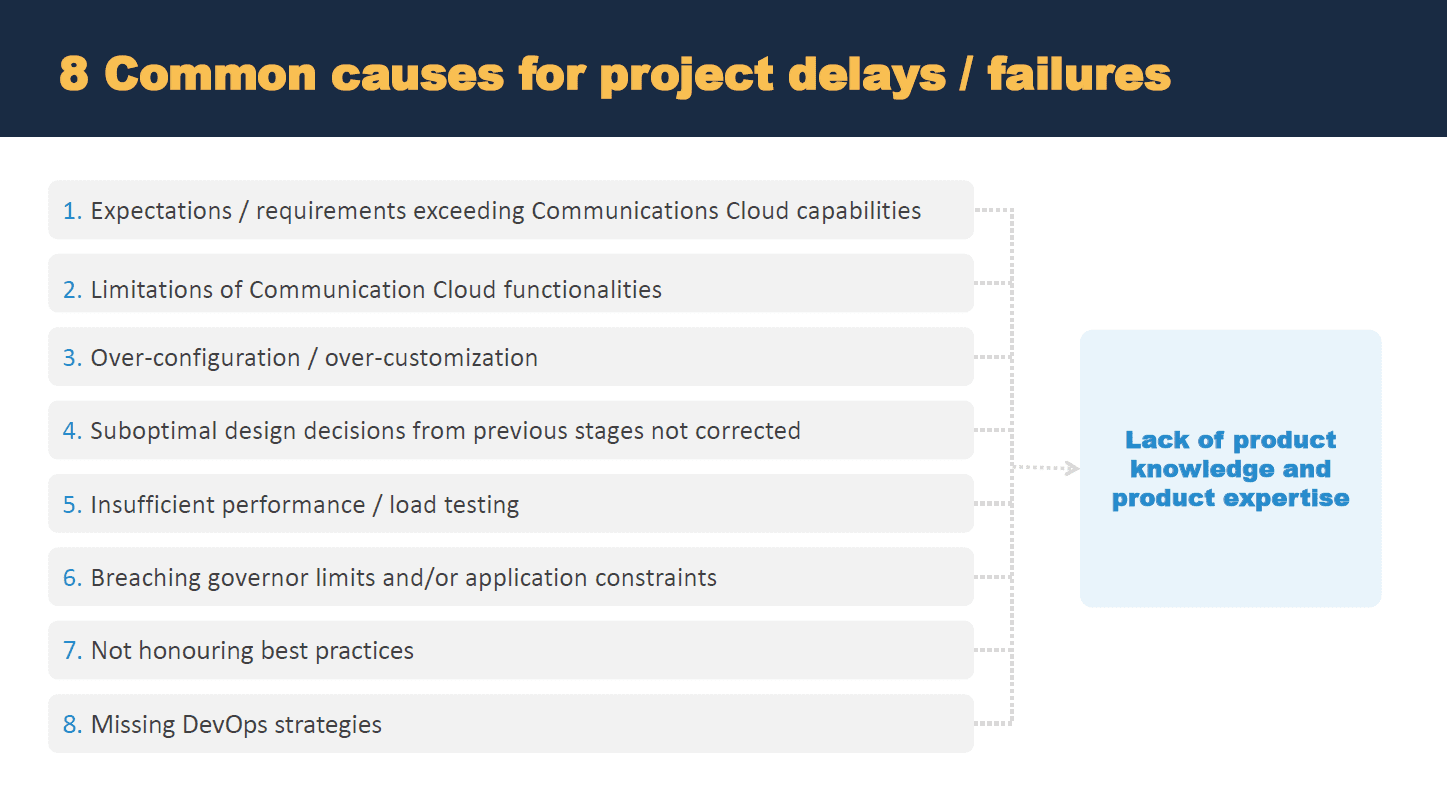
Expectations exceeding Communications Cloud capabilities
A very common occurrence is that the organization’s stakeholders’ expectations and requirements exceed Communications Cloud capabilities. It’s a wonderful tool, but as with all tools, it has certain limitations and boundaries. These limitations need to be understood by everyone who works on the project, so you can ensure that other business stakeholders are informed about any requirements that may fall outside of Communications Cloud functionality. To avoid this, make sure you conduct thorough requirements gathering and proper solution design. Once you’ve done that, be mindful of over-configuration or over-customization of the implementation. This can often cause a problem when trying to overcome the limitations of the functionalities of Communications Cloud.
Suboptimal design hangovers
Often, suboptimal design decisions from previous stages of the process are not corrected in time, which then compound and lead to poor implementation outcomes.
Insufficient performance testing
Another common issue among organizations implementing Communications Cloud is that performance and load testing plans are not carried out properly. Once a project is live, undetected application issues can crop up just as your customer is in the middle of the sales process. As this can deter them from going through with the process, you want to make sure you test, test, and test again before you launch.
Breaching governor limits
Application constraints are critical to understand and adhere to during implementation projects.
Failing to stick to best practices
Best practices are called such for a reason. They should be followed not only when deploying your EPC but also when designing anything that can affect performance, including OmniStudio, integration procedures, and Data Raptors.
Missing DevOps strategies
DevOps is vital for a successful project. So, make sure you establish processes from the very beginning and ensure these are being followed by every single person working on the project.
5. Make sure you have the necessary skills on your team
The one thing that underscores all the above implementation issues is a lack of product knowledge and expertise. Because without sufficient expertise, it is difficult to predict what stages of the implementation process may go wrong, and build solutions for these common pitfalls early in the process. Post-implementation, you also need the right skills on board to tweak, manage, and optimize Communications Cloud to get the maximum benefit.
And it’s no secret that Communications Cloud is a complex product. So, in order to truly drive customer success with this platform, you need to have skilled team members who have the knowledge and experience to deliver best practices. But finding great Communications Cloud professionals isn’t easy (or cheap for that matter), especially as the associated certification is notoriously difficult to earn, with <15% average accreditation pass rate across the Salesforce ecosystem.
How Revolent can help you build advanced Communications Cloud capabilities
To create more Communications Cloud talent in the ecosystem and help you build advanced Communications Cloud capabilities by reskilling your employees, we’ve teamed up with Salesforce to design the world’s first and only advanced Communications Cloud training program of its kind. Our use-case-driven implementation bootcamp is led by our expert Salesforce-certified instructors (who hosted the webinar). So, if you’re looking to build expert Communications Cloud skills in-house, this advanced training program will equip your teams with the Salesforce Communications Cloud Accredited Professional certification, while embedding practical skills through intensive use-case-driven modules and crucial consultancy skills development.
And it’s thanks to this unique approach that our training program now boasts a 6x higher-than-average pass rate for the Communications Cloud Accredited Professional exam.